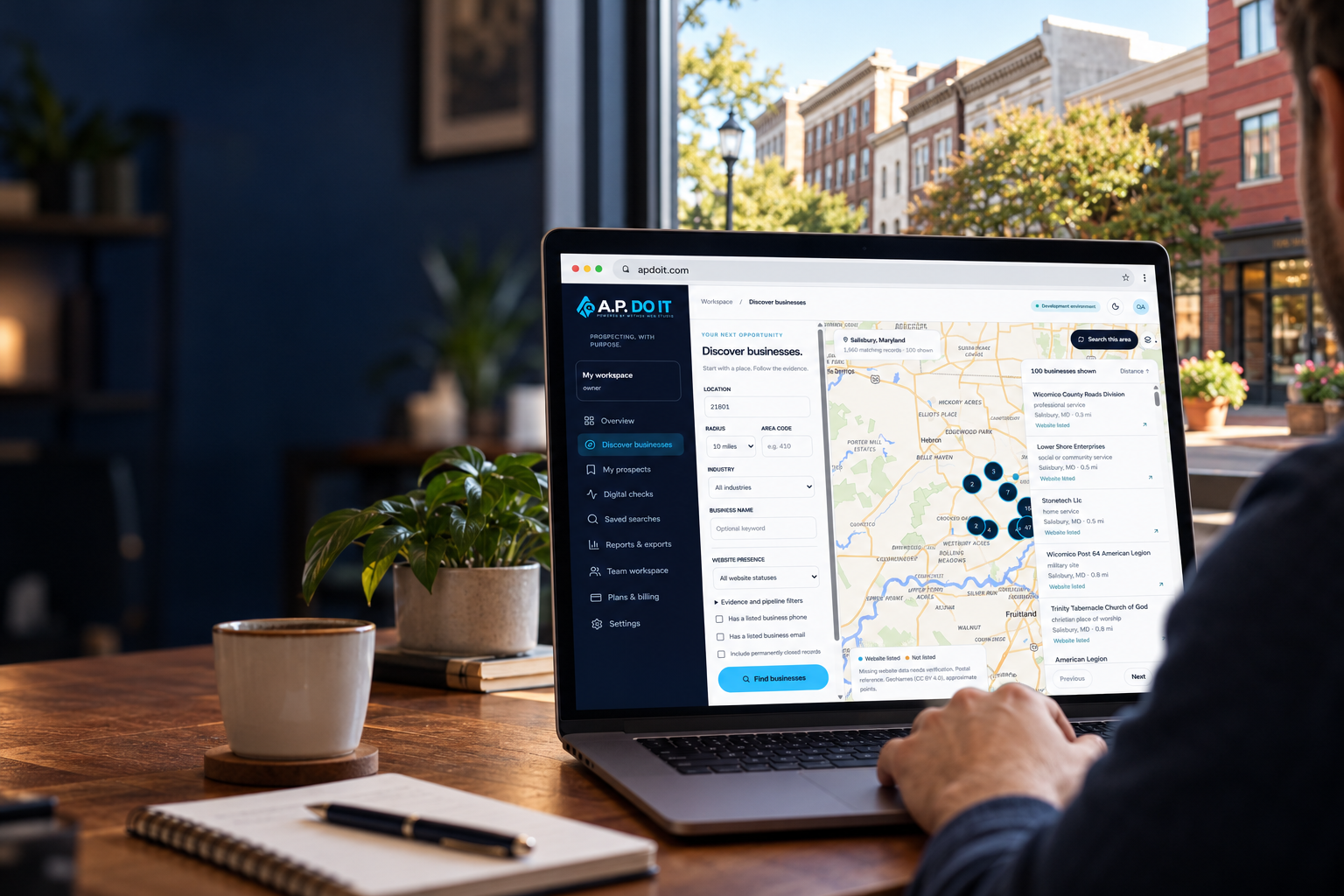
Find the Businesses.
Discover the Opportunities.
Discover local businesses, identify digital opportunities, and organize sales prospects from one intelligent map.
- Source-linked records
- Salisbury-area pilot
Illustrative Salisbury scene · Image & map credits
Less searching. More possibility.
Turn geographic business data into actionable sales opportunities. Bring the place, the listing, and the available digital evidence into one clear view.
A place to begin
A reason to connect
Choose a region you serve.
Explore real business listings.
Save the context that matters.
From the map to your next move.
A connected workflow for people who help local businesses grow. Discover, inspect, verify, and organize—without losing the source behind the story.
Start exploring-
Discover geographically
Search the regional pilot by location, radius, industry, and business phone prefix. Pan the map and search the visible area.
-
See the website evidence
A missing website field means the source did not list one. Inspect the available evidence before making a claim.
-
Access available contacts
Open listed phone, email, and website channels directly from the business profile. Missing details stay missing.
-
Keep your research together
Save a business to your organization’s private workspace. Add research notes, priorities, tags, and follow-up dates.
-
Move prospects forward
Use table and Kanban views to manage a shared pipeline. Respect Do Not Contact suppression on every export.
Your discovery workspace
Illustrative interface walkthrough
Location · ZIP 21801
-
A place to begin: Salisbury, MD
-
Filter by the services you offer.
Illustrative product walkthrough
- Workflow illustration · no live business identity
-
Check what the listing actually says.
-
Save the context. Plan the next step.
Your workspace. Your research.
Discover local. Work smarter.
Your focus. Your workflow.
Narrow your search to the businesses and places that make sense for your work. Keep the evidence visible and the next action clear.
-
Search radius
Focus on a 1–50 mile radius.
-
Industry
Explore categories from the source.
-
Website presence
Keep missing data distinct from verified absence.
-
Phone area code
Filter listed telephone prefixes.
-
Available contacts
Use only actual listed business channels.
-
Saved searches
Return to a useful set of filters.
-
Contact suppression
Honor persistent Do Not Contact records.
-
Team access
Keep each organization’s work private.
Try the actual interface · Read-only preview with real Overture pilot records
Account actions are disabled in this preview. No audit results or business identities are invented.
Built for the businesses around us.
For web agencies, sales teams, and digital consultants who serve local businesses. Explore the imported regional data and decide where further research is worthwhile.
Local business possibilities

Discover a neighborhood.
Understand the listing.
Find a useful starting point.
Keep the evidence.

See what’s actually available.
Verify before outreach.

Research with purpose.
Organize the next step.

Work from the same context.
Keep your pipeline private.
More context. Fewer assumptions.
The most useful opportunity starts with an honest picture of what you know—and what still needs to be verified.
Our product approach
Evidence before outreach
-
Imported from official Overture Places, with source provenance and retrieval dates.
Real business records
-
Website not listed is a data state, not a verdict about the business.
Conservative website labels
-
Each digital finding must carry evidence, a timestamp, and its limitations.
Explainable checks
-
Database rules scope prospects, notes, usage, and searches to the organization.
Private workspaces
-
No guessed employee emails, fabricated phone numbers, or synthetic identities.
Contacts as supplied
-
Keep notes and follow-up dates. Do Not Contact suppression survives status changes.
Thoughtful follow-up
-
The Salisbury pilot is a partial 2,000-record regional selection, not national coverage.
Transparent coverage
-
Authorized CSV exports retain source licenses and apply usage and suppression rules.
Your research, portable
Three steps to a clearer starting point.
Start with the place you serve, inspect the information available, and build a useful workflow around it.
-
Enter a location
Choose a supported ZIP reference or Salisbury, MD. Add a radius, an industry, or a phone-prefix filter.
-
Inspect the evidence
Open a business profile to see its available contact details, website state, source, license, and retrieval date.
-
Save the next step
Create a workspace to save prospects, add private notes, and manage a responsible follow-up pipeline.
Good questions. Clear answers.
Know what the pilot does, where the data comes from, and what remains to verify.
Where does the business data come from?
The regional pilot uses official Overture Maps Places release 2026-09-23.1. Per-property source information and applicable licenses are retained. See Data Sources for attribution and limitations.
Which locations can I search?
The initial pilot supports ZIP 21801, ZIP 21804, Salisbury, MD, and Wicomico County. It includes a partial 2,000-record selection within the Salisbury-area import bounding box. A wider radius does not create additional coverage.
Does “website not listed” mean a business has no website?
No. It means the imported source did not supply a website. Further permitted verification is needed before claiming that no website exists.
How do phone area-code searches work?
The filter matches actual listed business telephone prefixes and shows their available coordinates. An area code is not a precise physical geographic boundary.
Can I save prospects and notes?
Yes, signed-in users can save businesses in an organization workspace, add private notes, change pipeline statuses, and set follow-up dates. Role permissions are enforced in PostgreSQL.
Are digital checks comprehensive audits?
No. Initial checks observe bounded homepage signals such as reachability and metadata. They report dated evidence and missing information. They do not establish SEO rankings or promise sales outcomes.
Can I try the interface before creating an account?
Yes. The read-only product preview uses actual licensed pilot records. Saving leads and requesting checks require a signed-in workspace. Paid plans renew monthly until canceled. Review prices, applicable tax, and refund terms before payment.
Does the toolkit automatically contact prospects?
No. The MVP provides listed contact actions and private workflow tools. It does not send cold-email campaigns, bulk SMS, or automated calls.
How do refunds and cancellation work?
The pilot takes no real payments. When paid plans launch, request a full refund within 14 calendar days of the first payment or 7 days of a monthly renewal, with no usage threshold or cancellation fee. Cancel renewal online in Plans & billing. Read the policy or submit a billing request.
Your next opportunity starts with a place.
Discover. Analyze. Connect. Convert. Explore the real-data pilot and create a private workspace when you’re ready.
Let’s keep the context clear.
Explore the toolkit, understand its sources, or submit a data or billing request. Refund and cancellation terms are available before checkout.
-
The product
Explore the toolkit ↗ -
The evidence
Data sources & licenses ↗ -
Your workspace
Support & account requests ↗
Your next step, in one place.
Start with an interactive, read-only look at the Salisbury pilot. Create a workspace to save your own research.
Start exploringCreate a workspaceFor Maryland businesses · Monthly plans plus applicable tax · Cancel renewal online.